Touchbar: A Modern Sans Serif Font for Digital Design
In the fast-paced world of web design, the typeface you choose does more than just display text; it sets the tone for the entire user experience. When building interfaces for SaaS platforms, e-commerce stores, or high-converting landing pages, clarity and personality must coexist. This is where Touchbar shines. As a modern sans serif font inspired by technology and innovation, it brings a clean geometry and sharp aesthetic that feels native to digital environments. For UI designers and product creators, finding a premium font that balances technical precision with human readability is often the final piece of the puzzle in creating a cohesive brand identity.
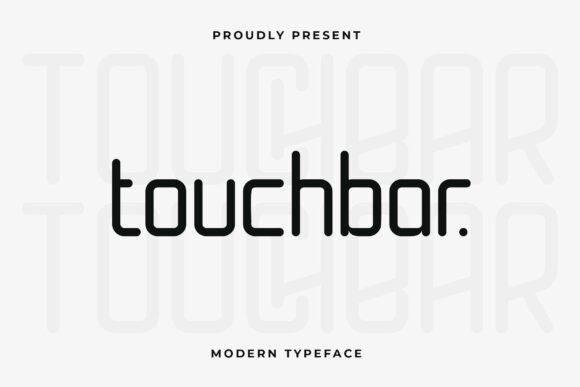
The visual character of Touchbar is defined by its minimalist construction. Unlike organic or handwritten styles that rely on fluid strokes, this typeface utilizes straight lines and geometric forms to create a sense of stability and forward momentum. The sharp edges give it a futuristic feel without sacrificing legibility, making it an ideal candidate for web design projects that need to communicate efficiency and modernity. Whether you are designing a hero section for a tech startup or a banner for an online course, the distinct personality of Touchbar helps establish immediate visual hierarchy.
Elevating Visual Hierarchy in Web Layouts
One of the primary challenges in digital product creation is guiding the user's eye through complex information architectures. Touchbar excels as a display font for headers, subheaders, and call-to-action buttons. Its bold presence allows it to stand out against lighter body copy, creating a clear scanning path for visitors. When used in hero sections, the font's geometric nature commands attention, ensuring that your value proposition is read first.
Consider a product landing page for a new software tool. Using Touchbar for the main headline creates a strong anchor, while its clean lines ensure the message remains readable even at large sizes. For navigation menus and interface labels, the uniformity of the letterforms provides a consistent rhythm that reduces cognitive load. Users can scan menus and buttons quickly, which is critical for reducing bounce rates and improving conversion metrics. The font works exceptionally well for short phrases, logo text, and decorative accents where a strong brand impression is required.
Optimizing Readability Across Devices
Responsive design demands typography that performs equally well on a 27-inch monitor and a 6-inch smartphone screen. Touchbar's open apertures and distinct character shapes prevent letters from blurring together on low-resolution displays or small mobile viewports. When designing for mobile-first experiences, it is essential to test how your chosen sans serif font renders in small sizes. Touchbar maintains its integrity even in compact navigation bars or footer links, ensuring that usability is never compromised for style.
For dark mode interfaces, which are increasingly popular in digital products, the high contrast of Touchbar's strokes ensures excellent visibility. Conversely, on light backgrounds, the sharp edges provide enough definition to keep the text crisp. When placing text over image overlays, consider adding a subtle backdrop or adjusting the font weight to maintain legibility. The versatility of this modern typography allows it to adapt to various background colors and textures without losing its professional edge.
Strategic Font Pairing for Brand Identity
No font exists in a vacuum. To create a rich and layered brand identity, you must consider how Touchbar interacts with other typefaces. Because it is a geometric sans serif, it pairs beautifully with a neutral sans serif font for body copy. This combination creates a harmonious look where the headings draw attention and the body text facilitates long-form reading without distraction. This approach is particularly effective for blog graphics, editorial content, and detailed product descriptions.
For brands seeking a more sophisticated or editorial digital presence, pairing Touchbar with a classic serif font can create a striking contrast. The technological feel of the headers juxtaposed with the traditional warmth of a serif body copy can convey trustworthiness alongside innovation. This technique works well for coaching websites, luxury online stores, or portfolio sites where the designer wants to highlight both creativity and professionalism. Avoid pairing it with overly decorative script fonts or handwritten fonts unless the goal is a specific, eclectic aesthetic, as the clash of styles might dilute the clean message Touchbar conveys.
Practical Applications for Digital Creators
The utility of Touchbar extends across various digital verticals. For a creative portfolio, using this font for project titles and navigation creates a gallery-like feel that lets the work speak for itself. In the context of an online shop, Touchbar can be used for category headers and sale banners to create a sense of urgency and modern appeal. For course sales pages, the clarity of the font helps break down complex curriculum details into digestible sections, enhancing the perceived value of the educational content.
Social media graphics also benefit from the bold structure of Touchbar. When creating assets for Instagram stories, LinkedIn carousels, or Twitter headers, the font's strong lines ensure that text remains readable even when scaled down for mobile feeds. Consistency across these touchpoints reinforces brand recognition, turning casual scrollers into engaged followers.
Licensing and Technical Considerations
Before integrating Touchbar into your next client project or commercial product, it is vital to review the licensing terms. Commercial font licensing ensures that you have the legal right to use the typeface in websites, digital templates, logos, and advertising campaigns. Always verify if the license covers webfont usage, as this requires specific file formats like WOFF or WOFF2 to ensure fast loading times and proper rendering across browsers.
Check the included styles and weights available in the family. A robust design asset will offer multiple weights, from light to black, allowing you to create nuanced hierarchies without needing to switch fonts. Additionally, look for multilingual support if your target audience is global. Features like alternates or ligatures can add a unique flair to logo design and custom branding elements, giving your project a bespoke feel. By understanding the technical specifications and legal requirements, you ensure that your digital products are not only beautiful but also compliant and performant.
Ultimately, Touchbar represents the intersection of form and function. It is a tool for designers who value precision and seek to create digital experiences that feel both current and timeless. By leveraging its geometric strengths and pairing it thoughtfully with complementary typefaces, you can build interfaces that resonate with users and elevate the overall quality of your digital presence.